Social Media Management Tools & Tips Blog | SocialMotus
  • Home
  • Features
    • Management
    • Monitoring
    • Discover
    • Publishing
    • Engagement
    • Tracking
    • Analysis
  • Pricing & Plans
  • Services
  • Blog
  • Contact
  • Write For Us

Subscribe

Subscribe to our newsletter to stay up to date with the latest news

Follow Us

  • RSS feed
  • Twitter
  • Facebook
  • Youtube

Archives

  • March 2013
  • December 2012
  • November 2012
  • October 2012
  • September 2012
  • August 2012
  • July 2012
  • June 2012
  • May 2012
  • April 2012
  • March 2012
  • February 2012
  • December 2011
  • November 2011
  • October 2011
  • September 2011
  • August 2011

Popular Posts

  • Why You Need Google Plus To Capture New Business And What Is The Social Network About? 22 Comment
  • 45 Awesome Twitter Marketing Tips For Business 19 Comment
  • 6 Twitter Tips To Boost Your Twitter Engagement 16 Comment
  • How To Get Twitter Followers Fast 6 Comment
  • How To Create An Effective Social Media Marketing Plan 6 Comment

New Facebook Fan Page Insights For Business Pages

You may have noticed over the past week, Facebook rolling out their updated Facebook Page Insights tool and a new expanded premium ad unit. Insights now goes beyond Likes and Impressions focusing on helping you increase engagement on your Facebook page.
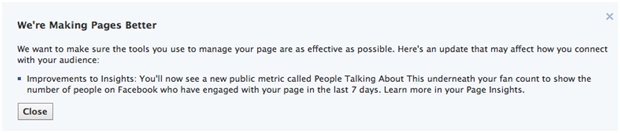
The most noticeable change within Facebook Insights came with the introduction of number of “People Talking About This” metric (seen below your fan count). This is a combination of a various interactions including likes, comments, shares, as well as video plays, RSVPs for events, and check-ins. Now you can see the articles with the most reach, shares and interactions.
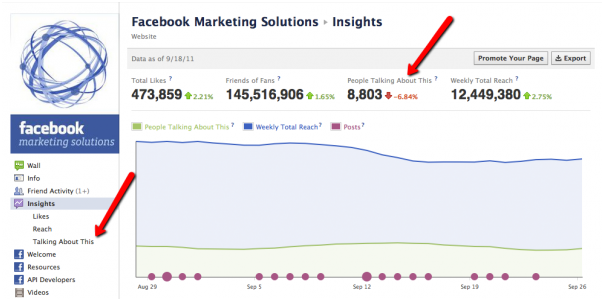
**Image from Web Pro News

Some other notable features include:
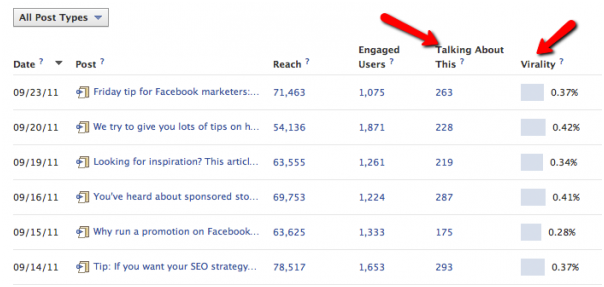
  • “Virality” - that measures the “Number of People Talking” divided by the Reach of your post. This metric will be created by taking the “People Talking About This Number”.
  • “Like Sources” - Now you know the source of your likes such as Like box, Like button, user suggestions and so on.
  • “Demographic Reach” - Now you have information on the age, gender and location for anyone that was exposed to your content, regardless of whether they are a fan of your Page or not.
  • “Friends of Fans” that will show the number of your fan’s friends your post reaches to determine the total number of people reached. This also includes how they were reached – either through visiting the Facebook Page, seeing a story by a friend, or an ad.
  • “How You Reached People” - Find out how people are finding your page (organic, paid or viral).
  • “Weekly Total Reach” which measures how many people have posted content about your Facebook Page, how many news organizations within Facebook have referenced it, and which sections of your page have gone viral.

**Image from Web Pro News

Web Pro News recently spoke to a Facebook representative who added, “To encourage third party development and analytics innovation, Facebook is also announcing a Page Insights API for the analytics developer community, so that they can create customized Page Insights solutions for existing and potential clients”.

The new metrics are great for analyzing engagement but all this extra data can make it confusing to decide what to focus on. We recommend you try a chrome extension called Hoverstats (Soon to be released for Firefox and IE). This specifically looks at the effectiveness of Facebook posts via the Post strength Indicator (PSI), which rates each Facebook post based on the total reach and engagement.

If your still wondering why you should bother with these new metrics, I’ll remind you that the era of relying on fan counts alone have gone. It is clear that you need to focus on encouraging engagement amongst your fans in order increase your EdgeRank score and have your post seen in your fan’s newsfeeds (Read our post on increasing your EdgeRank score here). Now with the updated Facebook Tool you’ll have access to a free tool to measure the impact of your posts, as well as help you create content that resonates with your fans.

2 Responses to “New Facebook Fan Page Insights For Business Pages”

    • Ron on  
    • October 13, 2011 at 5:46 am
    • Reply

    The new metric is useful, and will help people manage better their fan page in order to get more traffic.

Trackbacks/Pingbacks

  1. New Facebook Fan Page Insights For Business Pages - Social Motus Blog – Social Media Marketing and Monitoring Software | Social Business Marketing | Scoop.it

Leave a Reply

Click here to cancel reply.

Company

  • About
  • Partner Programs
  • Privacy Policy
  • Terms and Conditions
Tweet

Product

  • Social Management
  • Social Monitoring
  • Social Publishing
  • Social Engagement
  • Social Analytics
  • Conversion Tracking
  • Facebook Management Tool
  • Twitter Management Tool

Resources

  • Contact Us
  • Social Media Blog
  • Social Marketing Services

Follow Us

  • Subscribe to RSS
  • Follow us on Twitter
  • Like us on Facebook
  • Add to Google+ circles
  • Subscribe to our Youtube
  • View our slides Slideshare
  • Connect with us on LinkedIn

Copyright © 2012 - SocialMotus, an Apex Pacific company. All rights reserved.

  • Sitemap